Legal
SMS Notifications.
Last updated: April 29, 2026
1. Summary
Billet Systems LLC ("Billet") sends SMS text messages only for transactional purposes directly related to the delivery, signature, and account operations of its platform. This page describes every category of SMS message we send, how recipients opt in, the business relationship we rely on before sending customer messages, and how anyone can opt out at any time.
Billet never sends marketing, promotional, or advertising SMS. We do not rent, sell, or share phone numbers. Every phone number in our system is either (a) provided by a team member of a Billet customer as part of their own account, or (b) provided by a Billet customer (a business) as part of their pre-existing commercial relationship with their own customer (the SMS recipient).
2. SMS Categories and Sample Messages
Billet sends the following categories of transactional SMS, and no others. The customer delivery and signature texts (c and e below) are additionally gated by a customer double opt-in described in §3b, which begins with a one-time confirmation message: "{Company}: Reply YES to receive delivery & signature texts. Msg frequency varies, msg & data rates may apply. Reply STOP to opt out, HELP for help."
a. Two-Factor Authentication (2FA) Codes and Account Setup Links
Sent to a team member of a Billet customer account who has explicitly enabled SMS 2FA on their own user profile. Required to complete login when the feature is turned on. The same opt-in also delivers a one-time welcome/setup link when an administrator first adds the team member to a Billet account and the team member's SMS 2FA preference is on — covering the moment the team member is first invited to set their password.
Sample (login code): "Your Billet login code is 482139. This code expires in 5 minutes. Never share this code."
Sample (setup link): "Welcome to Acme Distributing! Set your password: https://app.billetsystems.com/setup/abc123 Reply STOP to opt out."
b. Driver Delivery Assignment Notifications
Sent to a driver employed by (or contracted to) a Billet customer when their dispatcher assigns them a delivery ticket. Fires only when the employing company has enabled driver SMS notifications as a company setting, and only when push notifications have failed to deliver.
Sample: "New delivery assigned: SO-4521 to Acme Plumbing, 1420 Main St. Open the Billet app to view."
c. Customer Signature Request Links
Sent to a specific end customer (the recipient of a delivery) when the driver marks the delivery as delivered without an on-site signature, so that the customer can sign remotely. Fires only when triggered by a driver action inside a Billet customer's account, and only when the Billet customer has stored that end customer's phone number in their own customer record (typically imported from their existing accounting system, ERP, or entered manually).
Sample: "Acme Distributing delivered your order SO-4521. Please sign here: https://app.billetsystems.com/sign/ABC123XYZ. Reply STOP to opt out."
d. Password Reset Codes
Sent to a team member of a Billet customer account who has initiated a password reset and whose account has SMS 2FA enabled. Email-based password reset is always available as an alternative.
Sample: "Your Billet password reset code is 739204. This code expires in 15 minutes. If you did not request this, ignore this message."
e. Proof-of-Delivery (POD) Confirmations
Sent to a specific end customer (the recipient of a delivery) confirming their delivery has been signed for and completed. Fires only when the Billet customer's company has enabled the POD SMS toggle, only when the end customer has no email address on file (email is the default delivery channel when available), and only when the Billet customer has stored that end customer's phone number in their own customer record (typically imported from their accounting system or entered manually).
Sample: "Acme Distributing: Your delivery (Order #SO-4521) has been signed and completed. Reply STOP to opt out."
3. How Opt-In Occurs
Each SMS category has a specific opt-in mechanism:
a. Team Member Opt-In (2FA and Password Reset)
A team member is added to a Billet customer account in one of two ways:
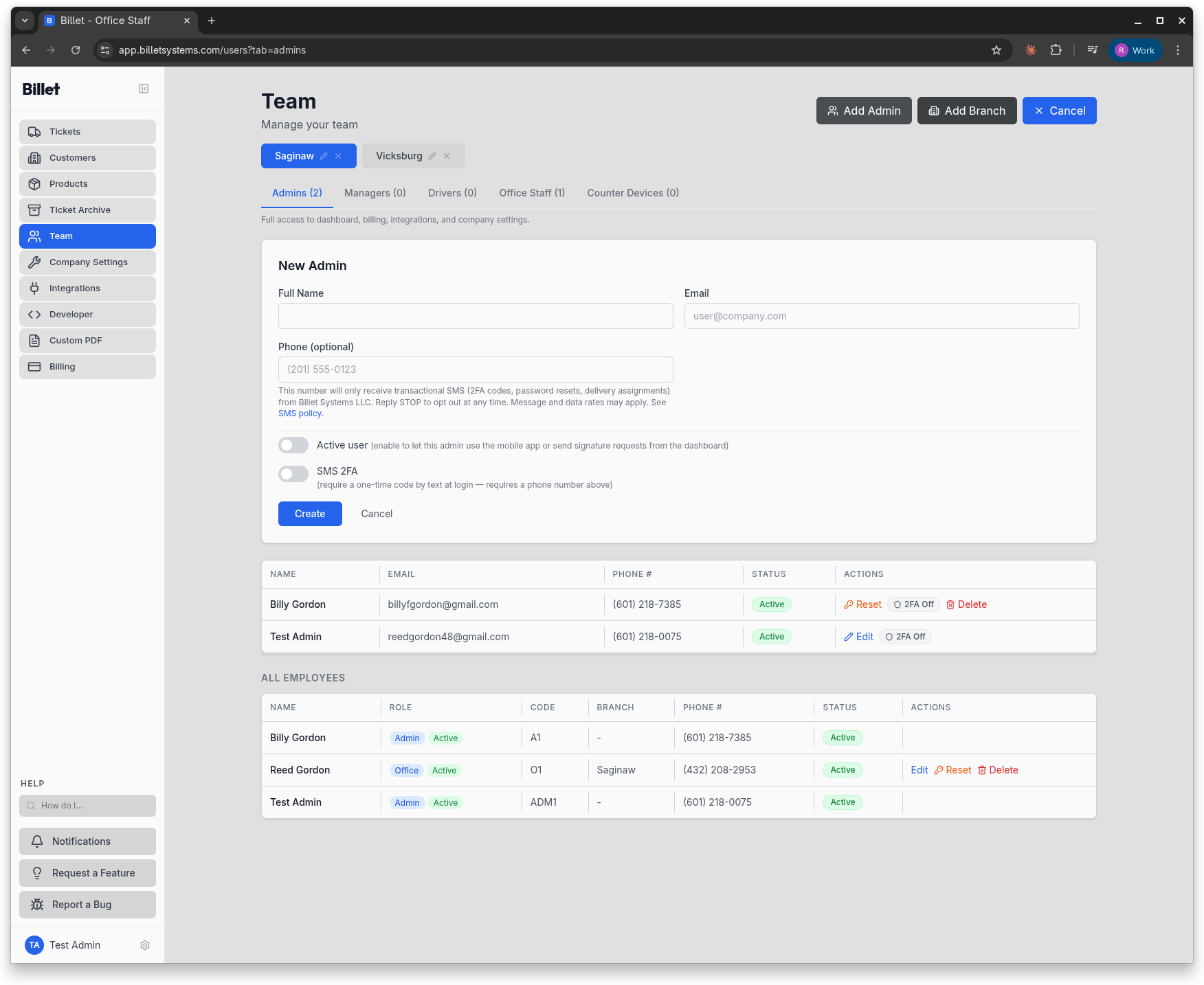
- The company administrator opens app.billetsystems.com → Team, clicks Add User, and enters the team member's name, email, phone number, and role. A disclosure is shown directly beneath the phone field stating that the number will only receive transactional SMS (2FA codes, password resets, delivery assignments) and that the user can opt out by replying STOP.
- The team member receives a welcome email, sets their own password, and logs in.
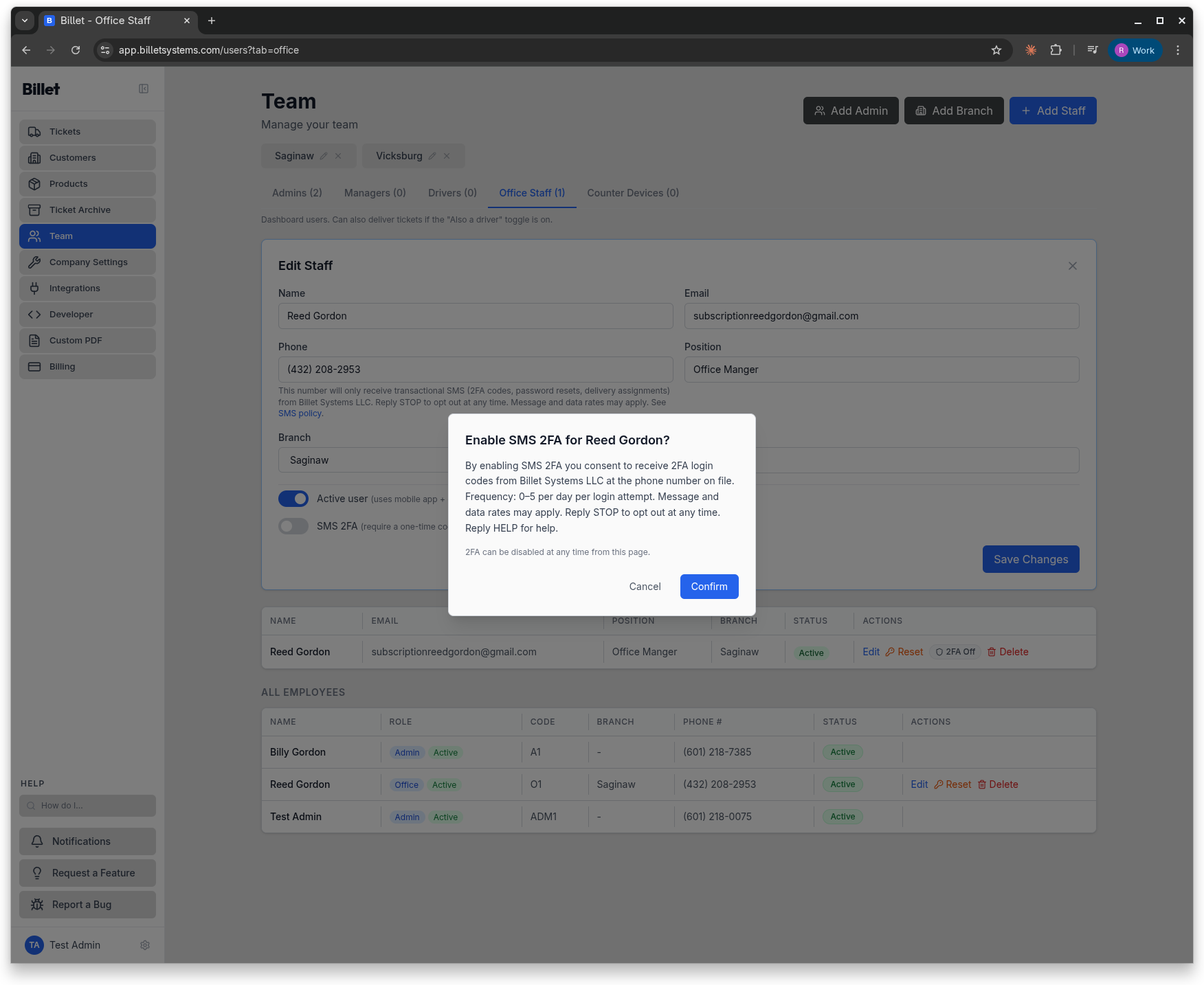
SMS 2FA is off by default for every new team member. To enable it, the team member (or their administrator) must explicitly toggle "SMS 2FA" to On in the Team page. The toggle is accompanied by a confirmation message stating the SMS terms. This explicit toggle is the opt-in event for the 2FA and password-reset categories.
b. Driver Assignment Opt-In
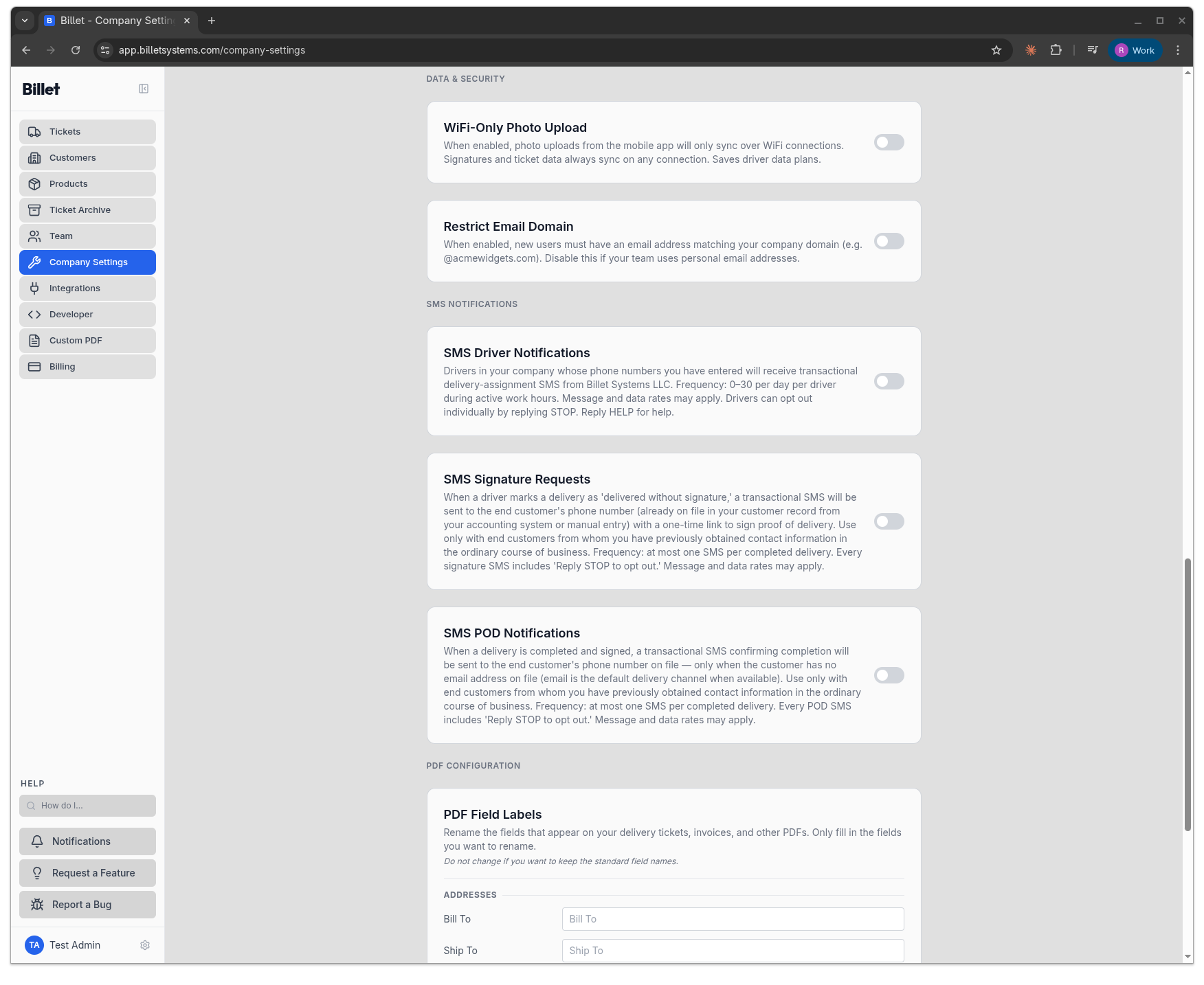
Driver delivery-assignment SMS is disabled by default on every Billet customer account. A company administrator must turn on the "SMS Driver Notifications" company-level setting. That setting is accompanied by a disclosure stating that drivers whose phone numbers have been entered by the administrator will receive transactional delivery-assignment SMS, and that drivers can opt out individually by replying STOP. Drivers' phone numbers are only in the system because their administrator entered them during team setup (see §3a above).
c. Customer Signature Request Opt-In (Pre-Existing Business Relationship)
Billet does not collect end-customer phone numbers directly from end customers and does not display forms to end customers. The end customer's phone number is already held by the Billet customer (the business) before Billet is ever involved. This is the "existing business relationship" basis for the SMS:
- The Billet customer is a distributor, contractor, or supplier who has been invoicing the end customer — typically for months or years — through QuickBooks Online, Xero, FreshBooks, Microsoft Dynamics 365 Business Central, Sage 100, or similar accounting/ERP software.
- When the Billet customer connects one of those accounting systems to Billet, their existing customer records (name, address, phone number, billing history) synchronize into Billet as a mirror of their own accounting database. Alternatively, the Billet customer can enter a customer record manually.
- The end customer's phone number originated in a direct business-to-business relationship — the customer provided it to the distributor when opening an account, placing an order, or receiving previous deliveries.
- A customer signature request SMS is only sent if the Billet customer's driver physically delivers goods to the end customer and marks the delivery as "delivered without signature," triggering the message. The content is strictly transactional: a link to sign proof of delivery for that specific order.
- Every signature request SMS includes "Reply STOP to opt out" in-line, as shown in §2c above. Opt-outs are honored globally across the Billet platform for the receiving phone number.
Before a Billet customer can send a signature request SMS, they must first enable the "SMS Signature Requests" company-level setting, which is accompanied by a disclosure that the feature should only be used with end customers from whom they have previously obtained contact information in the ordinary course of business.
d. POD Confirmation Opt-In (Pre-Existing Business Relationship + Email Fallback)
Same business-relationship basis as §3c. The end customer's phone number originated in a direct B2B relationship between the Billet customer and the end customer. Before any POD confirmation SMS is sent, the Billet customer must explicitly enable the "SMS POD Notifications" company-level setting, which is accompanied by a disclosure that the feature should only be used with end customers from whom they have previously obtained contact information in the ordinary course of business, that the SMS is sent only when the end customer has no email address on file (email is the default delivery channel when available), and that every POD SMS includes "Reply STOP to opt out." POD confirmation SMS is a one-time message per completed delivery — there is no recurring or scheduled cadence.
3a. Opt-In Visual Walkthrough
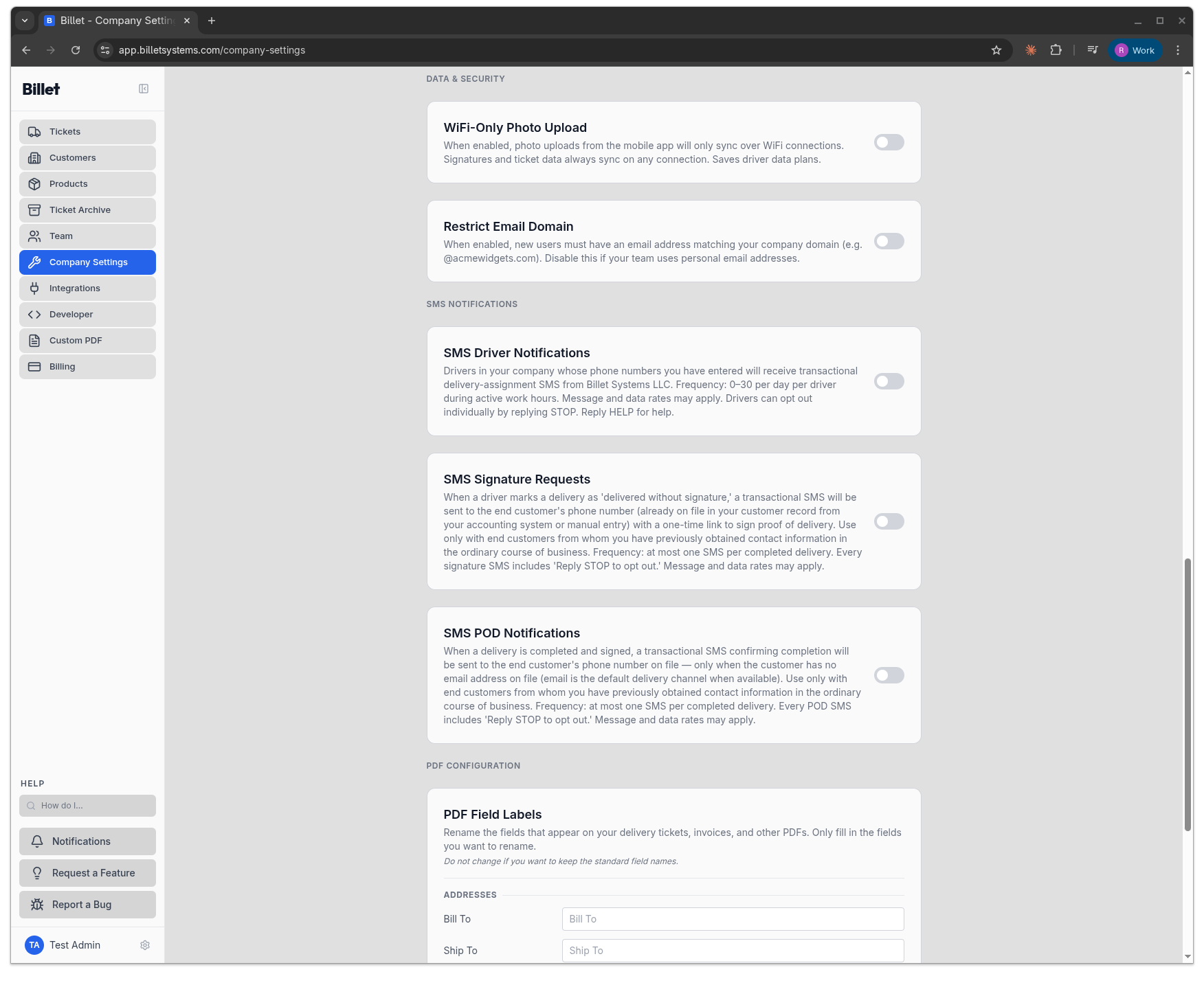
The screenshots below show the company-side surfaces where a Billet customer's staff or administrators opt in to SMS. Each toggle is off by default. Each is accompanied by an in-product disclosure stating the SMS category, sender identity (Billet Systems LLC), message frequency, "Message and data rates may apply," and "Reply STOP to opt out." No company-initiated SMS is sent until one of these toggles is turned on inside an authenticated dashboard session. Customer-facing delivery and signature texts use a separate, explicit customer double opt-in — see §3b below.
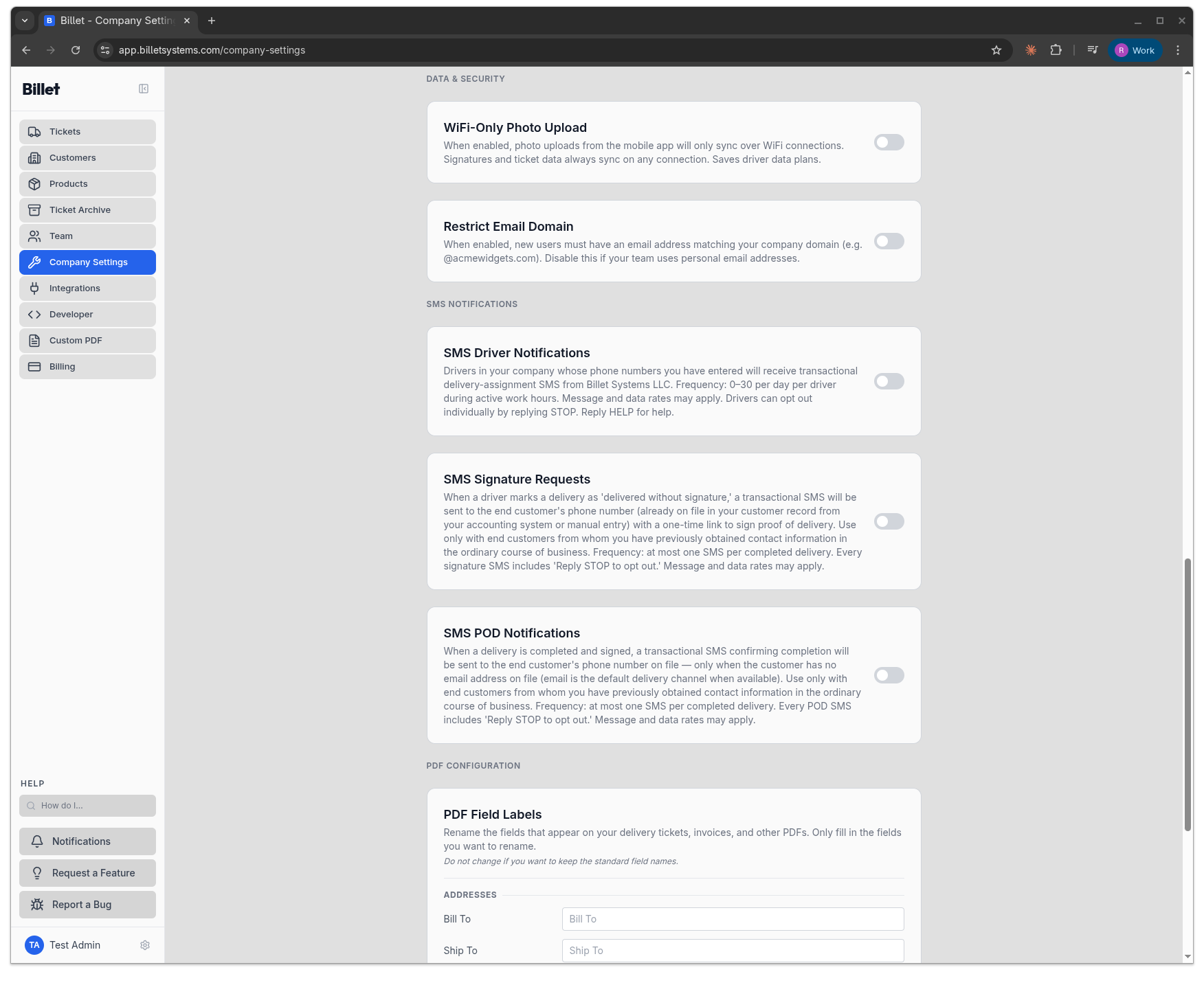
No mobile information collected for SMS — including phone numbers — will be shared with third parties or affiliates for marketing or promotional purposes at any time. Phone numbers are transmitted only to Twilio, Inc. (our SMS sub-processor under the A2P 10DLC framework) for the sole purpose of delivering the four transactional SMS categories listed in §2 above. The full sub-processor listing is available in our Privacy Policy §5.
3b. Customer Double-Opt-In — Delivery & Signature Texts
End customers never log into Billet, so they consent through an explicit, verifiable double opt-in — not a company toggle. The flow has three steps:
- Checkbox at signing. When a customer signs for a delivery on the web signature page (an emailed link), they see an unchecked box: "Text me delivery & signature updates from {Company}." The disclosure beneath reads: "By checking this box you agree to receive delivery and signature text messages from {Company} at this number. You'll get a one-time confirmation text first — reply YES to opt in. Message frequency varies. Msg & data rates may apply. Reply STOP to opt out, HELP for help," with links to these Terms and the Privacy Policy. The box is never pre-checked.
- One-time confirmation text. Only if the customer ticks the box, Billet sends a single confirmation SMS: "{Company}: Reply YES to receive delivery & signature texts. Msg frequency varies, msg & data rates may apply. Reply STOP to opt out, HELP for help." The customer is marked "awaiting confirmation" and is never re-prompted.
- Confirmed only on YES. The customer is enrolled only after replying YES. No delivery or signature SMS is ever sent to a customer before they complete this double-opt-in. Replying STOP opts out immediately and permanently.


Each consent event — the exact disclosure shown and the customer's YES or STOP reply — is written to an append-only audit log for A2P 10DLC and TCPA defensibility.
4. Opt-Out
Anyone who receives an SMS from Billet can opt out at any time by replying STOP to the sending number. Opt-outs are processed by our SMS provider (Twilio) and are honored globally across the Billet platform for the receiving phone number, across all four categories listed in §2. No further SMS of any kind will be sent.
Reply HELP for assistance information. You can also email [email protected] for manual opt-out or to request data removal.
Team members can additionally disable SMS 2FA from their account Team page at any time, which prevents any further 2FA or password-reset SMS to their number.
Company administrators can disable driver SMS notifications and customer signature-request SMS at any time from their Company Settings, which prevents any further SMS of those categories from being sent on behalf of their account.
5. Message Frequency and Rates
Message frequency varies based on account activity:
- 2FA codes: Only on login attempts; typically 0–5 per day per team member, and only if SMS 2FA is enabled.
- Password resets: Only when initiated by the user; typically 0 per day.
- Driver delivery assignments: 0–30 per day per driver during active work hours, only if enabled by the employing company.
- Customer signature requests: Sent once per delivery when a driver marks delivered-without-signature; the specific customer may receive none, or one per delivery, depending on how their supplier uses the feature.
Message and data rates may apply per the recipient's mobile carrier. Billet does not charge the recipient for any SMS. Carriers are not liable for delayed or undelivered messages.
6. Data We Store About SMS
For each SMS, we store: the category, the destination phone number, the timestamp, the Twilio delivery status, and the Billet account on whose behalf the SMS was sent. We do not store the body of the message text beyond what is necessary for audit and abuse investigation. SMS logs are retained for 24 months and then deleted, except where retention is required by law. See our Privacy Policy §2 for the full list of data we collect and §10 for data retention details.
7. Sub-Processor
All SMS is sent through Twilio, Inc. (101 Spear Street, 5th Floor, San Francisco, CA 94105), which acts as a sub-processor to Billet under our contractual agreement with them. Billet is registered with Twilio under the A2P 10DLC framework for transactional business messaging in the United States. Our assigned Twilio sending numbers are 10-digit long codes (10DLC) specifically approved for the categories described in §2 above.
8. Contact
Questions about this policy, our SMS practices, or requests for data deletion related to SMS:
Billet Systems LLC
Email: [email protected]
9. Related Documents
- Terms of Service — §7 covers SMS consent language
- Privacy Policy — §2 covers phone number collection, §5 lists Twilio as sub-processor